What is this blog about?
How B2B marketing teams apply landing page optimization (LPO), campaign-specific page design, form and CTA testing, and behavioral analytics, to turn enterprise traffic into qualified pipeline.
Who should read it?
- B2B marketers, digital marketers, and campaign owners building paid or organic landing pages.
- B2B marketing teams working to prove landing page ROI to executive leadership.
- Revenue and marketing operations leaders responsible for connecting landing page conversions to CRM pipeline.
Why is this important?
A landing page is often the point where campaign messaging, buyer intent, and conversion come together. If these elements are not aligned, even well-targeted traffic can fail to generate meaningful action. Landing page optimization helps B2B teams identify friction, improve the user experience, and create a clearer path from first visit to conversion.
What can you do with this insight?
Walk away with a practical framework covering campaign-specific page design, form and CTA optimization, trust signals, analytics tooling, and 2026 benchmark data you can compare your own pages against.
For B2B marketers, more traffic does not automatically mean more pipeline. The more important question is what happens once a prospect arrives. When ad campaigns’ click land on generic pages, forms ask for too much information, or CTAs fail to communicate value, B2B teams can lose high-intent prospects before sales ever sees them.
Landing page optimization provides a structured way to identify and address these gaps. From campaign-specific messaging and shorter forms to behavioural analysis and structured testing, each element can influence how effectively a page moves prospects toward action.
| Dimension | Generic Landing Page | Optimized B2B Landing Page |
| Traffic Destination | Campaign clicks routed to the homepage | Dedicated, campaign-specific landing page |
| CTA Strategy | Multiple competing calls-to-action | One personalized CTA, repeated down the page |
| Form Length | 10+ fields on average | Trimmed to 3 to 4 essential fields |
| Trust Signals | No social proof or credibility markers | Client logos, testimonials, and case studies |
| Mobile Experience | Desktop-first design adapted afterward | Mobile-first design, optimized for mobile-heavy traffic |
| Core Success Metric | Total traffic volume | Conversion rate benchmarked against industry median |
What High-Converting B2B Landing Pages Look Like
Phase 1: Foundation and Setup
1. Building Campaign-Specific Landing Pages
Effective landing page optimization starts with aligning each page to the campaign and audience it serves. Sending paid or organic traffic to a general page wastes marketing spend because visitors never see messaging built for their specific need.
- Match the page to the campaign: Build a dedicated landing page for each traffic source instead of routing everyone to the homepage.
- Duplicate and adapt: Once one page performs well, duplicate it and tailor the copy for each new campaign or audience segment.
- Keep messaging consistent: Design, tone, and offer should match exactly what the visitor clicked to get there.
2. Trimming Forms and Assigning Lead Value
Long forms create friction at the exact moment a visitor is deciding whether to convert.
- Cut fields to the essentials: Limit early-stage forms to email, first name, and company. SEO Sherpa’s 2026 data shows four fields convert 120% better than the 11-field average most landing pages still use.
- Reserve extra fields for high-intent offers: Add fields like job title or phone number only on demo request or pricing forms.
- Assign value to each conversion type: A demo request and a newsletter signup are not equal, so weight them differently in reporting.
3. Privacy and Compliance
- Consent-First Forms: Include clear consent language for marketing communications alongside every form, in line with GDPR requirements.
- Transparent Data Handling: Link a privacy statement on every landing page so visitors understand how submitted information will be used.
- Secure Lead Storage: Ensure form data flows into the CRM through encrypted, access-controlled integrations rather than manual exports.
Phase 2: Optimize the Conversion Experience
1. Writing Headlines and CTAs That Convert
SEO Sherpa’s 2026 statistics show 90% of visitors read both the headline and the CTA, making these two elements the highest-leverage part of any page.
- Lead with a clear headline: Place it at the top of the page, focused on a tangible outcome rather than an abstract promise.
- Build the page around one offer: Avoid introducing several competing actions that can dilute the visitor’s attention.
- Personalize the CTA: Personalized CTAs convert higher than generic buttons, and should repeat at intervals down the page. Use a button colour that clearly contrasts with the surrounding page while remaining consistent with the brand’s visual system. The CTA copy should also describe the action or value rather than relying on vague language such as ‘Submit’, ‘Click Here’, or ‘Learn More’. These practices support stronger landing page optimization.
2. Adding Trust and Credibility Signals
Enterprise buyers hesitate to convert on a page that gives them no reason to trust the company behind it.
- Show proof: Add client logos, short testimonials, and case studies from companies of a similar size or industry.
- Add a phone number: A visible number signals that real people stand behind the offer.
3. Measuring Engagement and Testing Pages
Quantitative metrics and behavioral tools serve as helpful indicators for ongoing landing page optimization.
- View heatmaps: Tools like Contentsquare and Microsoft Clarity show where visitors focus their attention and which sections get ignored.
- Watch session recordings: Real playback reveals exactly where visitors hesitate, scroll past, or abandon a form.
- Filter for friction: Use built-in filters to surface rage clicks, dead clicks, and excessive scrolling.
- Track meaningful actions: Time on page, scroll depth, and FAQ interaction reveal more than raw click counts.
- Run structured A/B tests: Platforms like VWO and Optimizely support multivariate testing across headlines, CTAs, and layout.
Phase 3: Advanced Landing Page Optimization and Infrastructure
1. Optimizing for Mobile-First Performance
- Design for mobile first: In Unbounce’s Conversion Benchmark Report, 83% of the landing page visits analysed came from mobile devices, while desktop converted 8% better than mobile. This makes mobile experience a critical conversion consideration.
- Prioritize fast loading: Keep images optimized and remove unnecessary elements that can slow the page.
- Cut unnecessary elements: SEO Sherpa’s 2026 research cites Google data showing that as the number of page elements increases from 400 to 6,000, the probability of conversion can decrease by 95%.
2. Connecting Landing Pages to CRM and Sales Systems
- Pass lead data automatically: Sync form submissions into the CRM the moment a visitor converts.
- Track the full journey: Follow a lead from first landing page visit through to closed deal.
- Report on qualified pipeline, not just form fills: This shows which campaigns generate real revenue instead of just traffic.
3. Building a Repeatable Page Library
- Template what works: Turn top-performing pages into reusable templates for new campaigns and segments.
- Retire underperformers: Regularly review page-level conversion data and sunset pages that consistently underperform their benchmark.
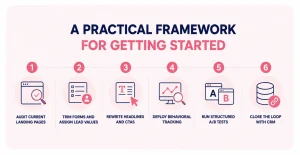
A Practical Framework for Getting Started
- Audit Current Landing Pages: Review each page against the buyer journey stage it targets and flag pages still routing traffic to the homepage.
- Trim Forms and Assign Lead Values: Cut every form to its essential fields and weight conversion types by business value.
- Rewrite Headlines and CTAs: Rebuild each page around a single, personalized offer with the CTA visible above the fold.
- Deploy Behavioral Tracking: Add heatmap and session-replay tracking through Microsoft Clarity or Contentsquare to find drop-off points and identify areas for landing page optimization.
- Run Structured A/B Tests: Use VWO or Optimizely to test single offer versus multi offer, and short versus long forms.
- Close the Loop With CRM: Connect every landing page conversion to CRM records so marketing can report on pipeline, not just traffic.
Practical Landing Page Optimization Tools
| Tool | Primary Use | Key Capabilities | Best For |
| Contentsquare | Behaviour analytics | Heatmaps, journey analysis, session replay | Understanding user behaviour and friction |
| Microsoft Clarity | Behaviour analytics | Heatmaps, session recordings, click and scroll analysis | Identifying page-level friction |
| VWO | A/B testing | A/B and multivariate testing, experimentation | Running structured CRO experiments |
| Optimizely | Experimentation | A/B testing, personalization, content optimization | Enterprise-scale experimentation |
| Unbounce | Landing page builder | Page creation, templates, campaign duplication | Launching pages without heavy developer support |
| Google Analytics | Performance analytics | Traffic, engagement, conversion and channel data | Measuring overall landing page performance |
The Road Ahead
Enterprise buyers increasingly form their first impression of a company through a landing page long before a sales conversation begins. As paid media costs rise and buyer attention gets harder to earn, a structured landing page optimization program keeps that first impression working as hard as the campaign that drove it. Teams that combine campaign-specific pages, continuous testing, and closed-loop CRM reporting will keep converting more of the traffic they already have, while teams still relying on a single generic page will keep losing leads before sales ever sees them.
Looking to optimize your B2B digital campaigns? Channel Technologies combines landing page optimization, CRO, analytics, and performance marketing to drive stronger conversions and qualified pipeline.
FAQs

How does landing page optimization differ from general web design?
Landing page optimization focuses on a single conversion goal and uses testing and analytics to improve specific elements, while general web design covers broader site navigation and information architecture.
Why should B2B teams build campaign-specific landing pages instead of using the homepage?
A dedicated page matches messaging to the exact traffic source, driving meaningfully higher conversion rates than sending visitors to a general page.
How many form fields should a B2B landing page include?
Early-stage forms should stay to three or four fields. SEO Sherpa’s 2026 data shows four fields convert 120% better than the 11-field average most B2B landing pages currently use.
How can B2B teams identify what is causing visitors to abandon a landing page?
Start with quantitative data such as conversion rate, form completion, scroll depth, and device performance. Then use behavioural tools such as heatmaps and session recordings to identify where visitors hesitate, encounter friction, or leave.
How does connecting landing pages to CRM improve marketing ROI?
Passing form submissions directly into the CRM creates closed-loop reporting, letting marketing show which landing pages generate qualified pipeline instead of just traffic and form fills.